Content review · Free resource pack
Website content audit template
Work out which pages need attention, what is wrong and what to change first.
3 pages · Fillable PDF · 19 KB · No signup
What this is for
Use this for a manageable set of website pages: a service section, a resource library or the pages a buyer reads before getting in touch. Start with the content people need for an important task. Traffic can help you set priorities, but you can still review clarity and accuracy without analytics.
Free to download and adapt for your own work. The PDF has six text fields and four review checkboxes. Save a copy after filling; use the text template for longer answers.
Work through it
Choose a useful slice of the site
List the pages involved in one reader task. For example, a buyer might move from a service page to a project example and then to contact. Review that path before collecting hundreds of URLs.
Keep observations separate from explanations
“The service page has no contact link” is an observation. “People leave because there is no contact link” needs behavioural evidence. Record the first immediately and keep the second as a hypothesis unless the data supports it.
Decide what each page needs
Keep a page that does its job. Update a useful page with specific gaps. Combine pages only when they serve the same need and no important information will be lost. Flag a page for retirement only after checking its links, obligations and replacement.
Order the fixes by consequence
Fix wrong prices, broken actions and unsupported claims before cosmetic edits. Next, address missing information on important pages. Give each action an owner and a completion check. Leave traffic impact unassessed when you do not have data.
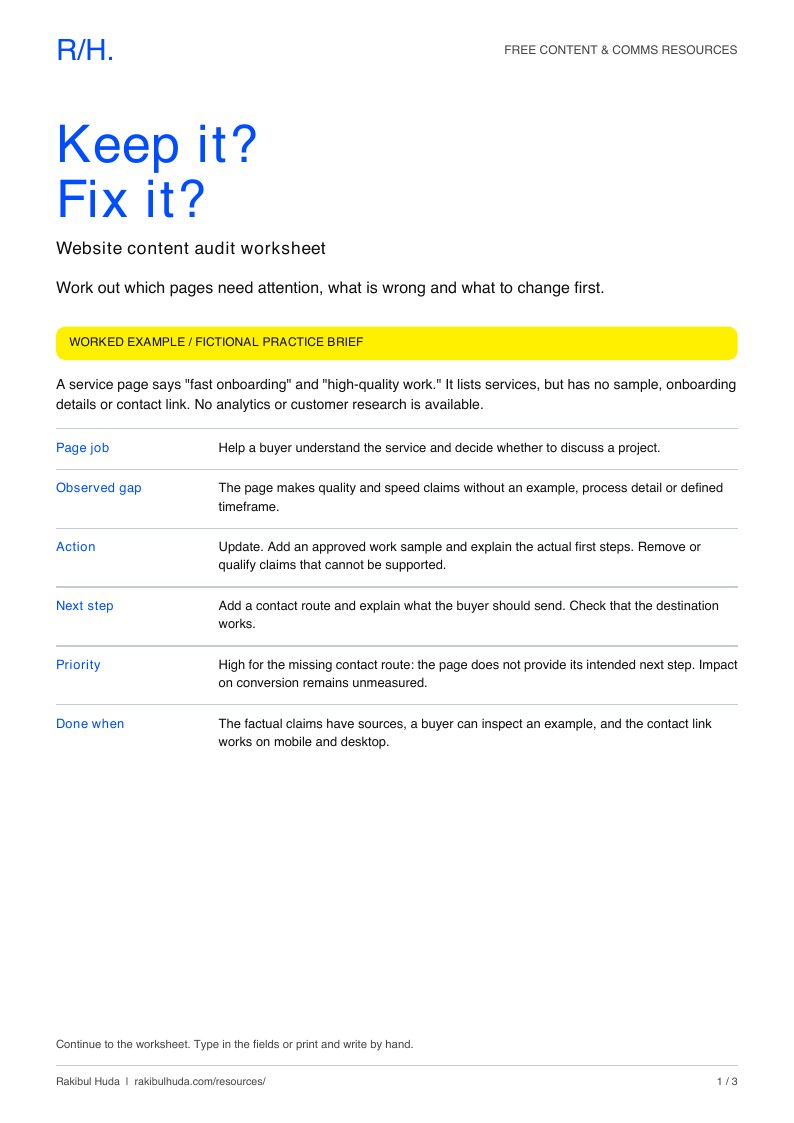
A filled example
Fictional practice audit. No real website or analytics account was assessed for this example.
A service page says “fast onboarding” and “high-quality work.” It lists services, but has no sample, onboarding details or contact link. No analytics or customer research is available.
- Page job
- Help a buyer understand the service and decide whether to discuss a project.
- Observed gap
- The page makes quality and speed claims without an example, process detail or defined timeframe.
- Action
- Update. Add an approved work sample and explain the actual first steps. Remove or qualify claims that cannot be supported.
- Next step
- Add a contact route and explain what the buyer should send. Check that the destination works.
- Priority
- High for the missing contact route: the page does not provide its intended next step. Impact on conversion remains unmeasured.
- Done when
- The factual claims have sources, a buyer can inspect an example, and the contact link works on mobile and desktop.
A service page needs something to support its claims
The fictional audit on this page finds missing proof and an unclear next step. In the SEBPO case study, visitors can inspect the original presentation alongside the write-up. Those samples help a reader assess the work. They do not establish how much traffic or how many enquiries a page creates.
SEBPO sales presentation ↗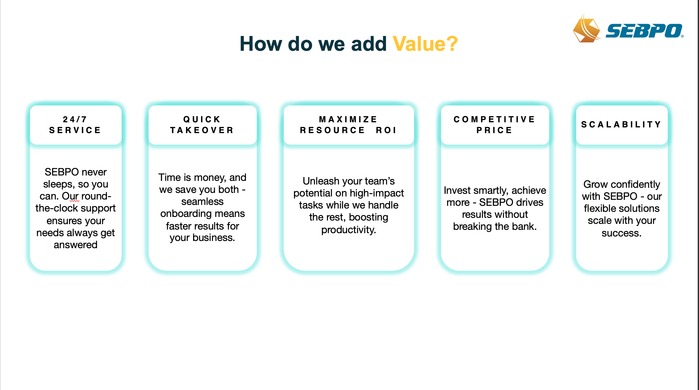
The editable template
Copy this into your document and fill in the blanks. Add or remove sections to fit the brief.
WEBSITE CONTENT AUDIT

Scope / reader task:
Reviewer / date:
Pages included:
Available analytics period / none supplied:

REPEAT FOR EACH PAGE
URL / title / owner:
Reader and page purpose:
Intended next action:
Date and source of the facts on this page:

OBSERVATIONS
Accuracy: outdated or unsupported statements?
Clarity: can a reader explain the offer?
Evidence: examples or sources available?
Action: can the reader complete the next step?
Accessibility: meaningful headings, link text and image descriptions?
Findability: links from relevant pages?

DATA (IF AVAILABLE)
Metric / period / source / limitation:
Unknowns or hypotheses:

DECISION
Keep / update / combine / review for retirement:
Reason, supported by an observation:
Exact change needed:
Priority and consequence if left unchanged:
Owner / due date:
Done when:

IF COMBINING OR RETIRING
What useful material must be preserved?
Replacement URL and internal links to update:
Redirect and approval needed?

FOLLOW-UP
Date checked / what changed / unresolved issue:
Before you use it
- Can each recommendation be traced to a page observation or supplied data?
- Have you avoided treating missing analytics as zero traffic?
- Is there a replacement plan for any page proposed for retirement?
- Does every priority action have an owner and a completion check?
Content audit AI skill
A skill is a saved set of instructions for your AI assistant. This one helps it work through the template and keep missing information visible.
Bring: Page URLs or pasted copy, the reader’s task, and analytics only if you have them.
ZIP · 2 KB · One SKILL.md file · No scripts or account connection
How to use it
- Unzip the download. Follow your assistant’s instructions for adding the skill folder.
- If your assistant does not support skills, open SKILL.md and paste its contents into a chat before your request.
- Add your source material and the request below. Review the answer against your sources before using it.
Use material you are allowed to share. The skill drafts or reviews content; it does not publish anything. Results depend on the assistant and the information you supply.
A request to start with
Use the content audit skill to review the pages below. Separate observations from hypotheses. Recommend specific changes, and mark traffic impact as unknown where no data is supplied.

Reader task:
Pages or copy:
Analytics and date range, if available:
Constraints:
Read the full skill before downloading
---
name: evidence-led-content-audit
description: Review supplied website pages for accuracy, clarity, evidence and the next action; produce an ordered content fix list. Use for an editorial content audit, with or without analytics. Does not run a security or technical SEO audit.
---

# Evidence-led content audit

Review the content needed for a reader to complete a task. Keep the scope to the pages or section the user names. This is an editorial audit, not a security scan or a promise of search rankings.

## Gather evidence

Read each supplied page or copy sample. If browsing is unavailable, audit the supplied text and state which interactions, images or links you could not check. Never report an unvisited page as inspected. Record the URL or document location and review date.

Identify the page's intended reader, job and next action. Use supplied goals; infer a provisional purpose only when necessary and label it. Separate directly observed issues, data-supported findings and hypotheses. A page with no supplied analytics has unknown traffic, not zero traffic. Preserve the period, units and source of any metrics; do not infer causation from a small change.

## Decide what to do

Assess factual accuracy, clear explanation, supporting evidence, useful headings and link labels, image descriptions when visible, and whether the next step is available. Cite the relevant text or page location for each finding. Avoid a generic checklist when a page-specific recommendation is possible.

Recommend keep, update, combine or review for retirement. Combine only when reader needs genuinely overlap and useful material has a destination. A retirement recommendation must name the unresolved checks, such as backlinks, required information, replacement content and redirect planning. Do not delete or redirect a live page as part of the audit unless specifically authorized.

Order actions by the consequence of leaving the issue unresolved. Wrong facts and broken intended actions normally precede cosmetic edits. Explain the reason for a priority without inventing an ROI score. Account for the user's actual business priorities.

## Deliver

Return a compact page register and an ordered fix list. For each action, include the observation, evidence location, proposed change, reason for priority and a completion check. Include an owner only when supplied; otherwise mark it unassigned. State any access limitations and data gaps. Do not imply that editorial changes guarantee traffic or enquiries.
Look at the evidence on a portfolio page
The SEBPO write-up pairs an account of the work with the original slides. Use it as a reference for making evidence easy to inspect.
See the project ↗